Enhance Your
Kick.com Experience
Channel tracking, live notifications, chat filters, custom user cards, and multi-stream viewer. All in one lightweight extension.
Features
Channel Tracker
Track any Kick channel's live status in real time. Get desktop notifications when channels go live with customizable Do Not Disturb hours.
Groups
Organize channels into custom groups and filter your list with tabs. Assign channels to multiple groups for flexible organization.
Chat Filters
Filter words, users, bot commands, and emoji spam. Choose between Hide or Blur mode. Adjustable emoji threshold from 1 to 30.
Multi-Stream
Watch up to 4 Kick channels simultaneously. 5 layout options including side-by-side, grid, and focus mode with drag-and-drop reordering.
User Identity Cards
Custom glassmorphism profile cards with banners, avatars, social links, follow dates, subscription info, and channel badges.
12 Languages
Full localization support: English, Turkish, Spanish, French, German, Italian, Portuguese, Russian, Japanese, Korean, Chinese, Arabic.
Screenshots
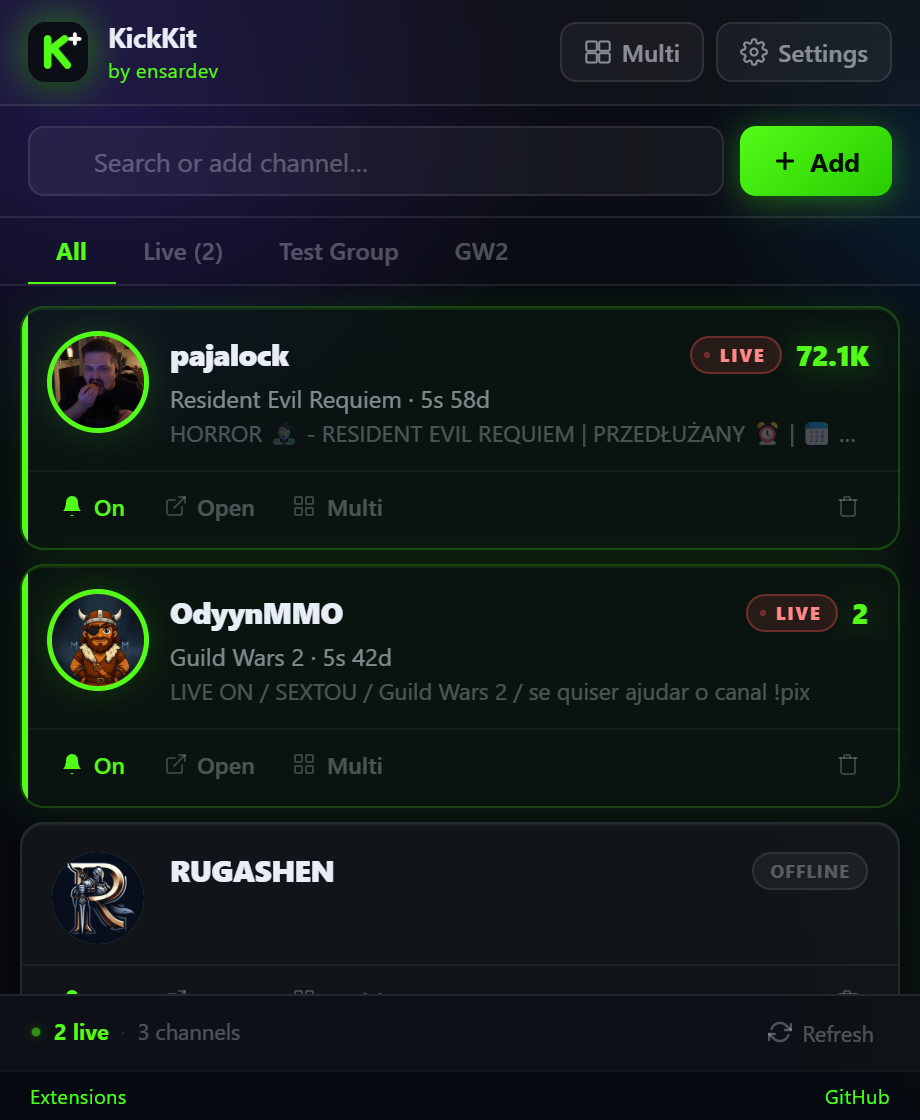
Channel Tracker
Track your favorite Kick channels. See who's live, viewer counts, categories, and stream duration at a glance.
Installation
Not yet on Chrome Web Store. Install manually in developer mode:
- Download or clone the repository
- Open Chrome and go to
chrome://extensions - Enable Developer mode (top-right toggle)
- Click Load unpacked and select the
kickkitfolder - The KickKit icon will appear in your toolbar